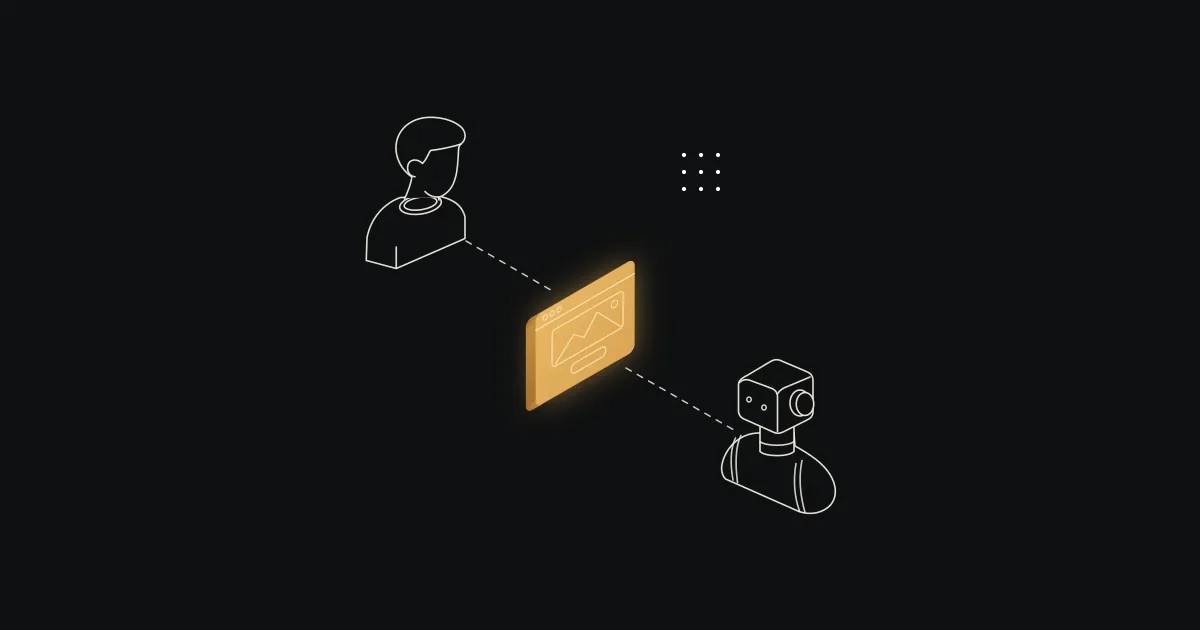
More than half of the visitors on your website aren't people.
Ten years ago we learned to build for two screens, mobile and desktop. Same content, different needs. Now there's a second split: humans and machines. And the machines already won the headcount.
I think this changes how websites should be built, and even more how they should be edited. Here's what we see, and what we do about it.
The visitors you never see
The numbers depend on who's counting. Thales/Imperva says 53 % of traffic in 2025 was bots (report). Fastly says 49 % for January 2026 (Fastly). Cloudflare saw about 57 % of HTML requests in early June 2026 (Search Engine Land).
To be fair, most of those bots aren't AI. They're scrapers, scanners and attackers. AI is still a small slice, but the fastest growing one: HUMAN Security saw AI-driven traffic grow 187 % in 2025 (HUMAN).
And AI bots are terrible guests. They eat everything and rarely bring anyone back. In July 2025 Cloudflare counted about 1 091 OpenAI crawls for every visitor OpenAI sent. For Anthropic it was over 38 000 (Cloudflare).
Bots cost money
Every bot request hits your server. On a fast, cached site that's close to free. On a slow site where every page view hits the database, it adds up.
At Wikimedia, bots are about 35 % of pageviews but 65 % of the most expensive traffic (Wikimedia). Read the Docs had one crawler pull 73 TB in a single month. That was over 5 000 $ (about 4 400 €) in bandwidth (Read the Docs).
So my first question for a new site isn't about design anymore. It's: what happens when 10 000 bots show up at once?
They see a different website
A person sees your hero image, your video and the button your designer spent a week on. Most AI crawlers see none of it.
GPTBot, ClaudeBot and PerplexityBot don't run JavaScript (Vercel). If your content only appears after JavaScript loads, for them it doesn't exist. They do download images, so alt text and file names still matter.
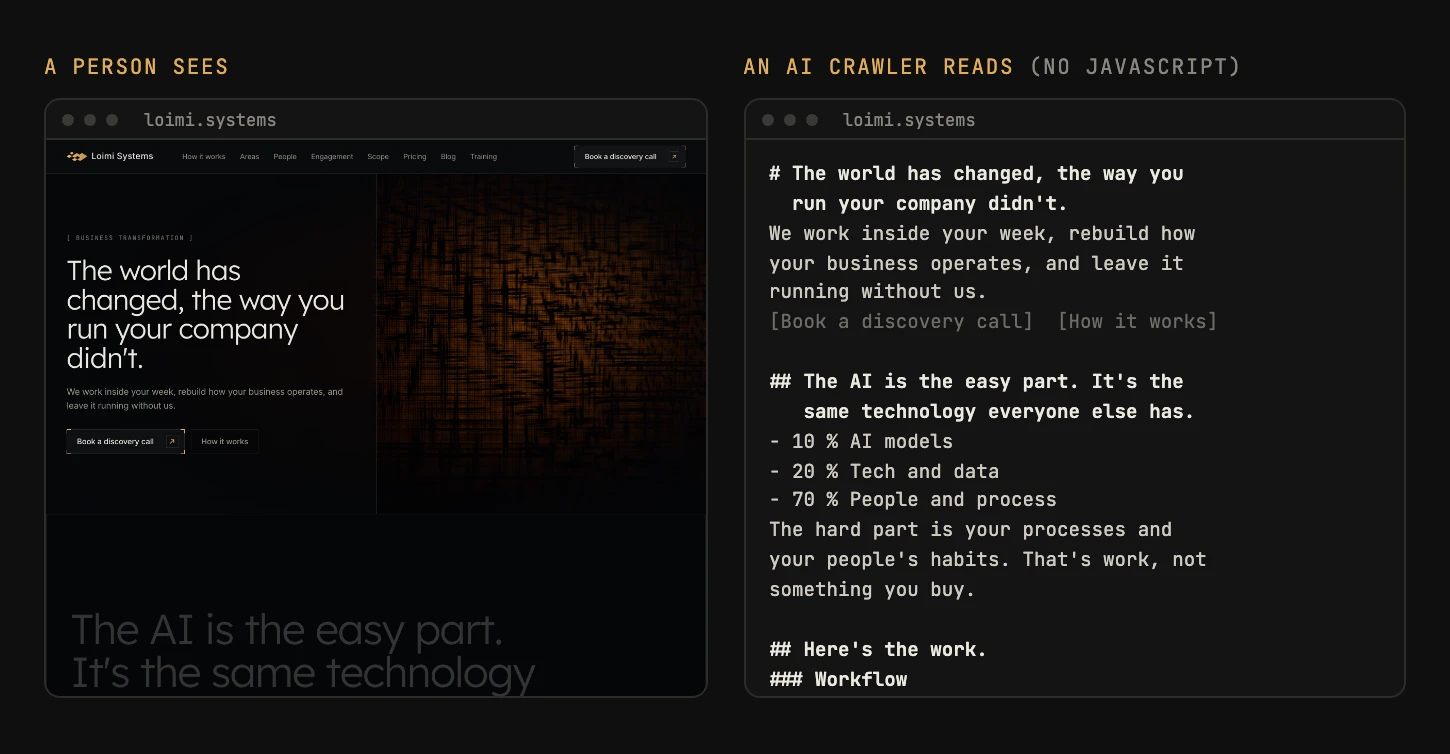
Bots don't click ads, don't scroll and don't care what's above the fold. Your analytics mostly don't see them either, because tracking runs on JavaScript too.
The exception is agentic browsers like Claude in Chrome or Perplexity Comet. They open the page like a person would, and your analytics happily count them as humans (HUMAN). So now you have three kinds of visitors: people, crawlers, and agents doing errands for people.
Machines like plain text
Clean text is cheaper for an AI to read than heavy HTML. Cloudflare can now turn a page into Markdown when an agent asks for it. In their example, a page went from about 15 000 tokens to about 2 100 (Cloudflare).
What doesn't work, at least yet: llms.txt. Google says it ignores the file (Google), and Ahrefs found that 97 % of sites publishing one got zero requests for it in May 2026 (Ahrefs). Cheap to add. Just don't expect miracles.
New protocols, mostly early
Agents are getting their own protocols too. Google and Shopify have the Universal Commerce Protocol, live in Google AI Mode for some US merchants (Google). OpenAI and Stripe have the Agentic Commerce Protocol, Google has AP2 for payments, and Visa and Mastercard are piloting their own.
My take: watch it, don't bet the shop on it. They compete, and things change fast. OpenAI already stepped back from its own checkout in ChatGPT in March 2026 (TechCrunch).
One protocol has clearly won, though: MCP. More on that below, because our whole setup runs on it.
Decide who learns from you
An AI quoting you and an AI training on you are two different things. You can now say yes to one and no to the other.
The big AI companies use separate bots for search and for training. OpenAI has OAI-SearchBot for search and GPTBot for training (OpenAI), so you can allow one and block the other in robots.txt. On 30.10.2026 Anthropic, OpenAI, Google and Microsoft also backed one shared opt-out rule for training (IETF draft). Anthropic follows it now, Microsoft from 01.02.2027, Google in early 2027 (Google).
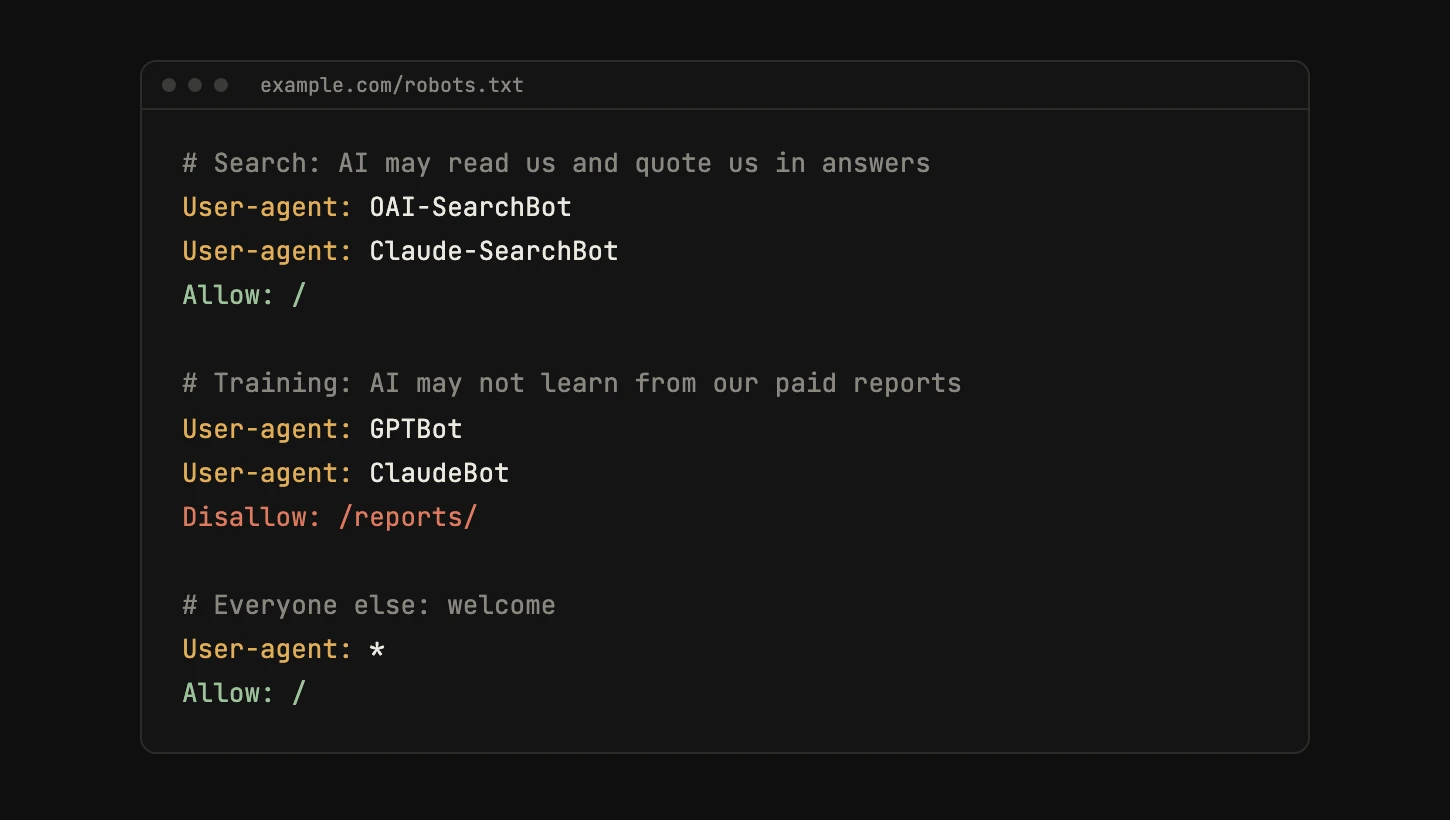
Should you use it? For most companies, no. If models never learn about you, they won't recommend you either. It makes sense when the content itself is what you sell: research, paid reports, courses. Then you want the citation, not the free copy.
And remember, these are requests, not locks.
Fewer clicks, better clicks
People ask AI instead of searching, and when Google shows an AI summary, they click less. Pew found 8 % of people clicked a result when there was an AI summary, against 15 % when there wasn't (Pew). Ahrefs found the top result gets 58 % fewer clicks when an AI Overview shows up (Ahrefs).
Paid search has held up better. Seer Interactive called paid clicks "the most steady and predictable" channel in its 2026 study (Seer). But PPC isn't the escape route people hope for. The ads are moving into the AI answers: Google already runs ads in AI Overviews and AI Mode (Google Ads), and ChatGPT started showing ads this year (OpenAI).
The good part: people who come from an AI assistant often arrive ready to buy, because they already did their research. In September 2026 Adobe saw them convert 90 % better than other traffic in US retail (Adobe). That's new, though. In March 2025 they still converted 38 % worse.
Fewer clicks, each one worth more. So the page they land on had better be good.
How we build websites now
We moved our own projects off WordPress long ago. What's new is that the tools are finally good enough to do the same for clients, including people who'd never call themselves technical.
Every page we build is static: plain HTML, made in advance, so there's nothing to compute when someone, or something, opens it. We build with Astro. All the content is in the HTML from the start, so crawlers see everything without running JavaScript. Every page also gets a plain-text Markdown copy, made automatically and linked from the page itself. An AI that only wants the content can read that instead of the full HTML, and nobody has to remember to make it.
Code only runs where it earns its place, like a form, a cart or a booking widget. Astro calls these islands: small pieces of a page that run code (Astro). Everything else stays static.
We host on Cloudflare Pages, mostly because it doesn't care about bots. Static files there are free with no traffic limit (Cloudflare), and you get Cloudflare's CDN on top, a network of servers that keeps copies of your site close to every visitor. 10 000 bots or 10 million, the bill for static pages stays at zero. Domains, DNS and firewall rules live in Cloudflare too, and Cloudflare has its own MCP server, so we manage all of that from Claude (Cloudflare).
The islands are the part that can cost money. They run on Cloudflare Workers, billed per request, and the paid plan has no hard spending cap. You get budget alerts, and they arrive a day later (Cloudflare). So we rate-limit, add bot checks and make sure automated traffic can't trigger anything expensive.
For e-commerce we keep the shop engine. The front is still Astro, and Shopify or WooCommerce stays the back end. Rebuilding checkout would be silly. And because the front is static, the shop back end only works when someone actually shops.
We also don't marry a provider. This space moves too fast for that. Static files run anywhere: Cloudflare today, Netlify tomorrow, Vercel the day after. Our back-end code can move just as easily. We want the best provider every year, not last year's.
No admin panel
This is the part people push back on most. Hear me out.
Look at how content gets made today. People research in ChatGPT or Claude, write there, make images there. Then they copy-paste it all into a WordPress admin panel. The AI part takes minutes. The copy-paste part takes the afternoon.
People also got used to building by chat. Lovable, the Swedish AI builder, passed 600 M $ (about 533 M €) in annual revenue in September 2026 (TechCrunch). The CMS world sees it too. WordPress, Webflow and Sanity all have MCP servers now, and Cloudflare even built a new CMS on Astro called EmDash (Cloudflare). Yes, EmDash. As someone who has banned em dashes from everything he writes, I find that very funny.
Most of these bolt AI onto an admin panel. We went the other way: start from the chat and drop the panel. Not a website with an AI button, but a website you edit by talking to it.
Wait, what is MCP?
MCP (Model Context Protocol) is a standard plug that lets an AI assistant use other software. Think USB for AI. Any tool that speaks MCP can be connected to Claude, ChatGPT and most other assistants, and the AI can then read from it and do things in it.
Early MCP was clunky for this kind of work. The July 2026 revision made it stateless: no handshake, no sessions, so a server behaves like any normal web service (MCP blog). And since January 2026, MCP Apps let a server show real interactive screens right inside the chat, safely sandboxed (MCP blog).
How it works
Every website lives in a Git repository, which is basically version history for files: every change saved, nothing ever lost. The repositories sit on our own Forgejo server. Forgejo is an open-source alternative to GitHub, and we self-host it on purpose. Client content stays on our servers, behind a firewall, with encrypted backups in several places. Public platforms are a juicy target for stolen access tokens: in September 2026 one campaign pushed malicious code into 772 GitHub repositories (GitGuardian).
Next to it runs our editor, an MCP server we built that sits between people and the code. The machine it runs on isn't reachable from the internet at all. Requests come in through Cloudflare Tunnel, and Cloudflare Access checks who you are before anything else (Cloudflare).
For the client it's three steps:
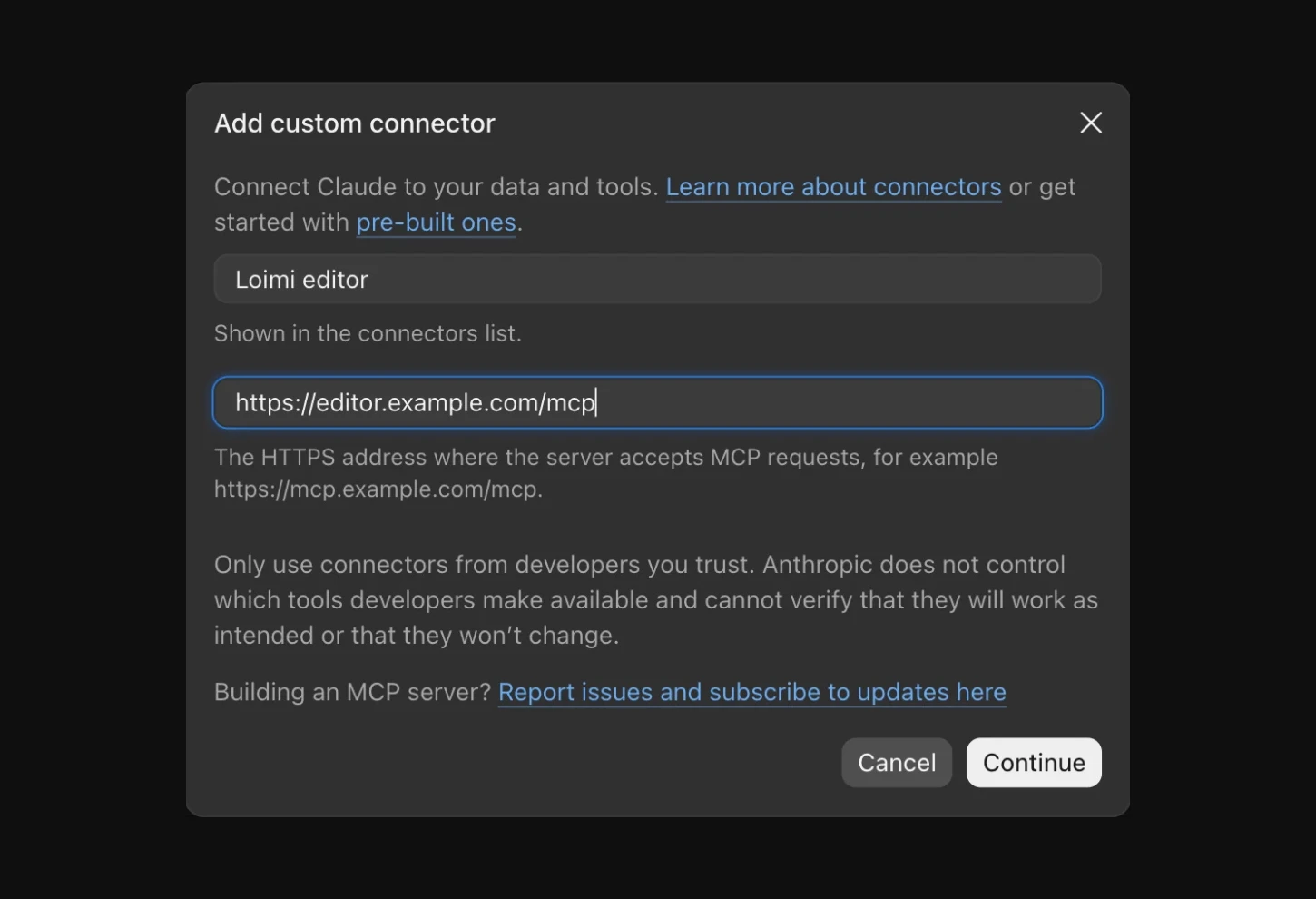
- Add one custom connector in Claude or ChatGPT.
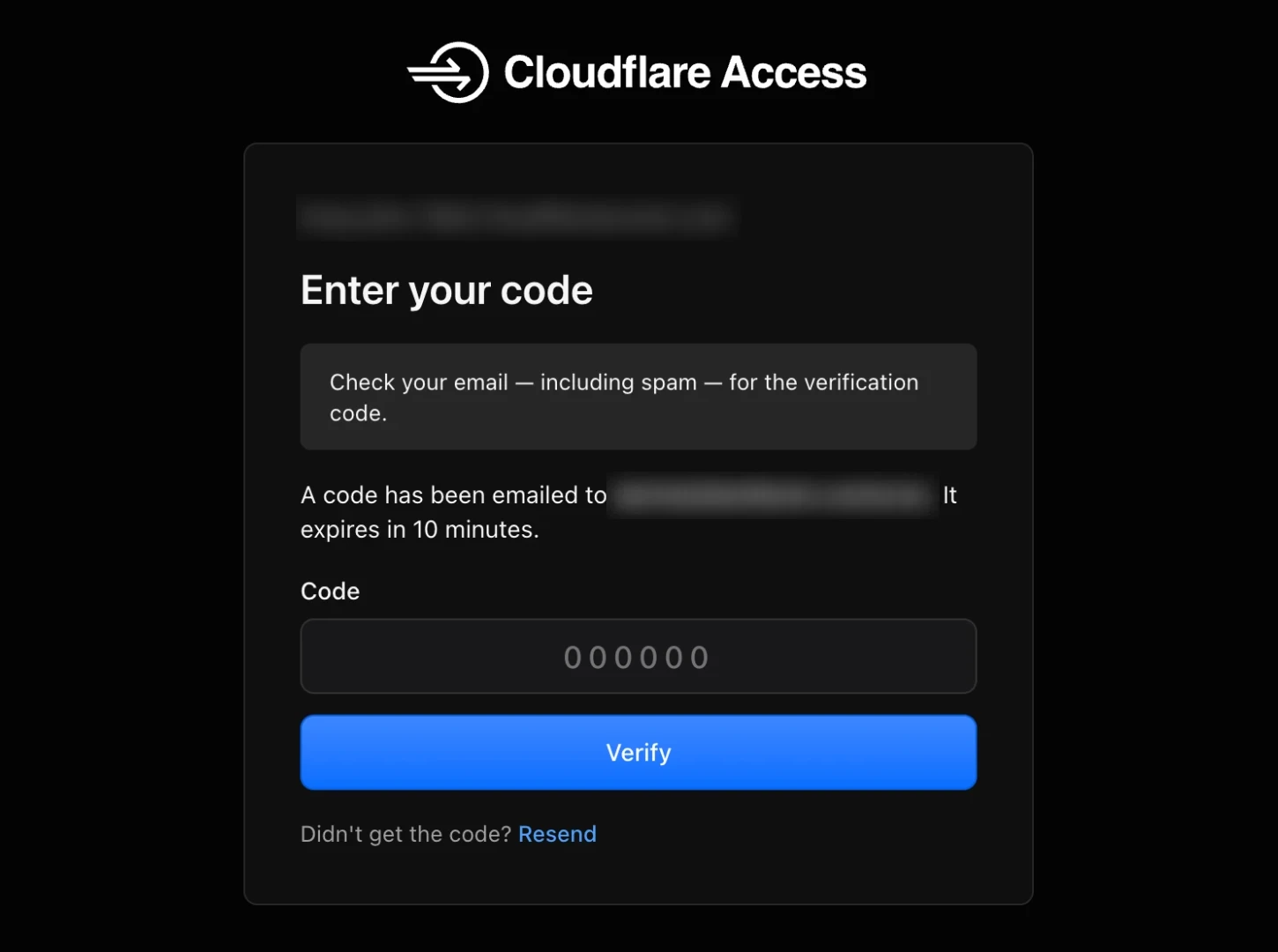
- Log in with your email and a one-time code.
- Say what you want changed.
Your email decides which sites you can touch. One, or twenty.
What you can do now that you couldn't before
If you run ten websites and the privacy policy changes, that used to mean ten logins. Now it's one sentence. Same for a contact page, or a colleague who appears on five sites.
Your whole workflow can live in one chat, because there's a connector for almost everything now. Say you run an SEO audit through your SEO tool's connector. The AI reads the findings and suggests changes to the site. You read them and say "do it". It applies them to a preview, runs the audit again on that preview, and tells you what got better and what didn't. You never opened another tool, and nothing was copy-pasted.
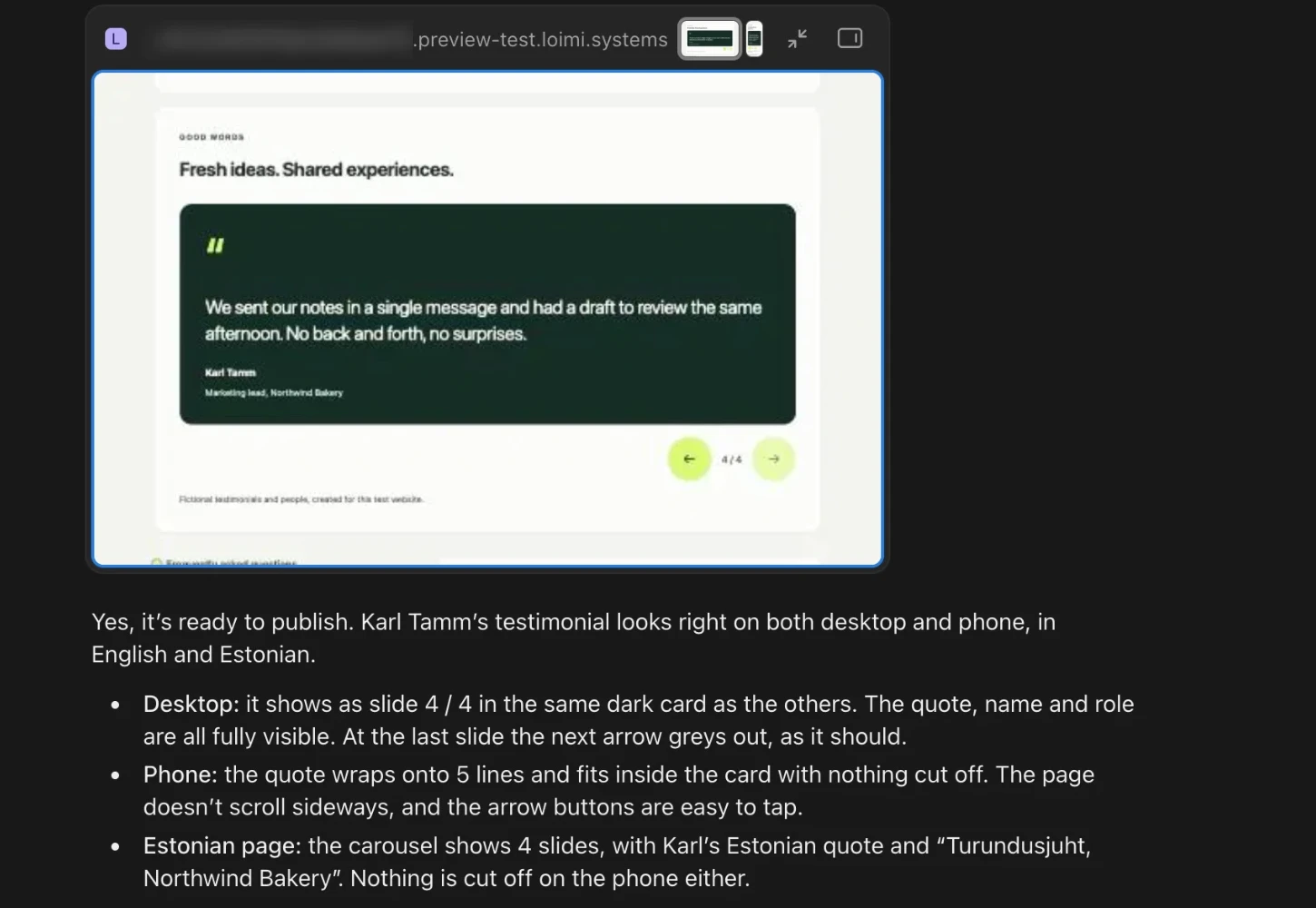
Nothing goes straight to the live site, and this is the beautiful part. Every change goes to a preview link first. The AI opens that preview itself, checks its own work on mobile and desktop, and comes back with "ready, want me to publish?". It's a closed loop, and you only step in where your judgement is actually needed.
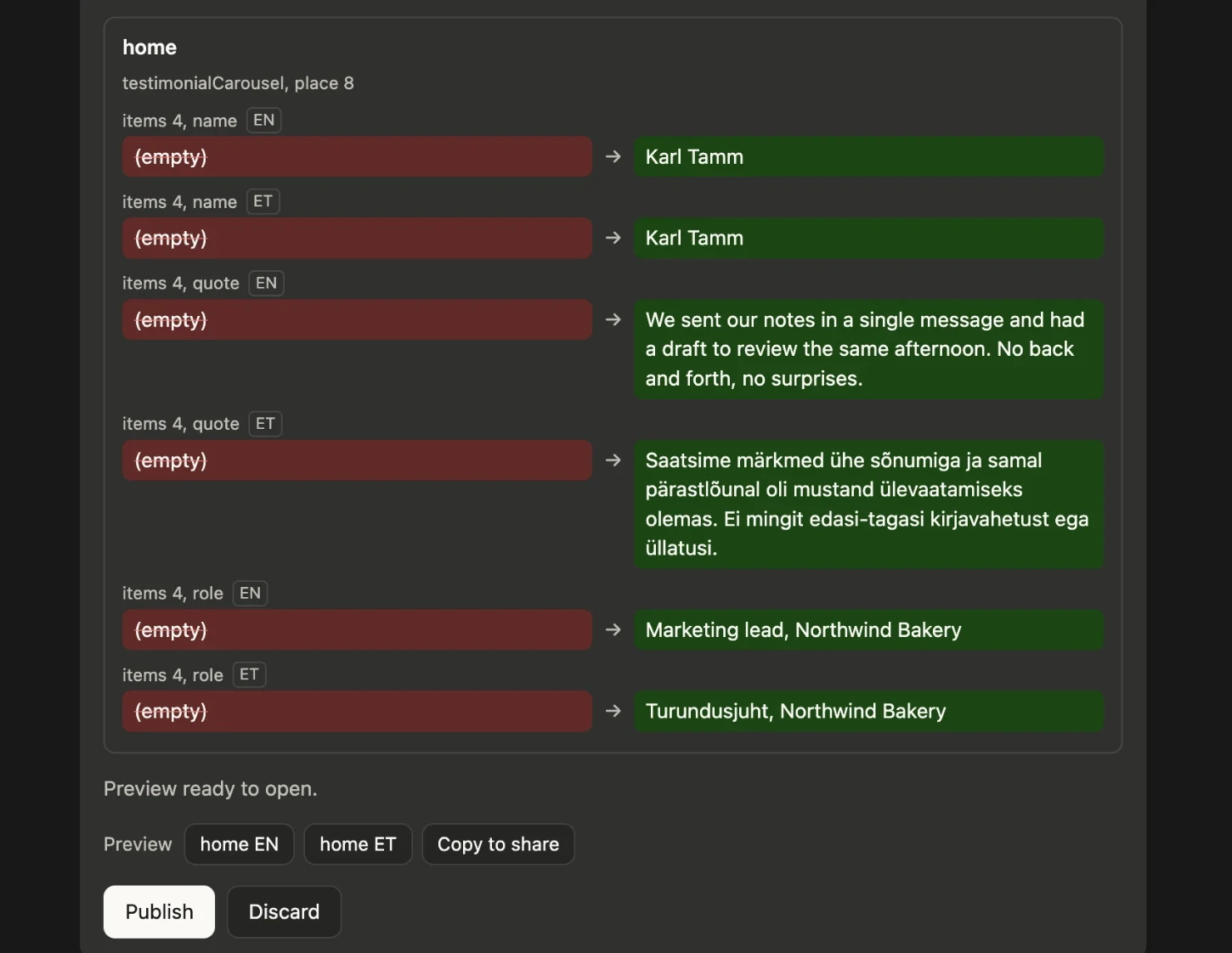
Every change can also be undone. It's Git underneath, so every version is saved, with who changed what and when. Something went badly wrong? "Revert that." Done.
The editor keeps you on brand, too. It holds the site's design system and hands it to the AI before every change. Like a landing page on a competitor's site? Paste it and say "something like this, in our look". Need an icon for a new service page? That used to be a ticket to a designer. Now ChatGPT's new image model, Images 2.6, out since 04.11.2026, can draw it in your style. It does GIFs now too (The Verge). Brace yourselves.
A side note on AI images, because people ask: the EU AI Act doesn't ban them. But since 02.08.2026, realistic AI content that could pass as real has to be disclosed (European Commission). I expect bigger brands to keep real photos and use AI for icons and illustrations.
The editor also knows the house rules for every block on the site. How long a headline can be before it breaks the layout. How much text fits in a card. Which image sizes a section needs. It's not a brain, but it knows what a good web developer would tell you before you break something.
The same goes for what the company knows. That knowledge usually sits in three people's heads: which keywords we target, our tone of voice, which words we use and which we never use, which competitors we never mention, which case studies we're allowed to show. In our setup the editor reads it from the company's Notion, its second brain. So when marketing updates the tone of voice, the editor uses the new version the same day. Write a blog post that sounds like a press release, and the editor tells you so, with hints on what to change, before anything goes live.
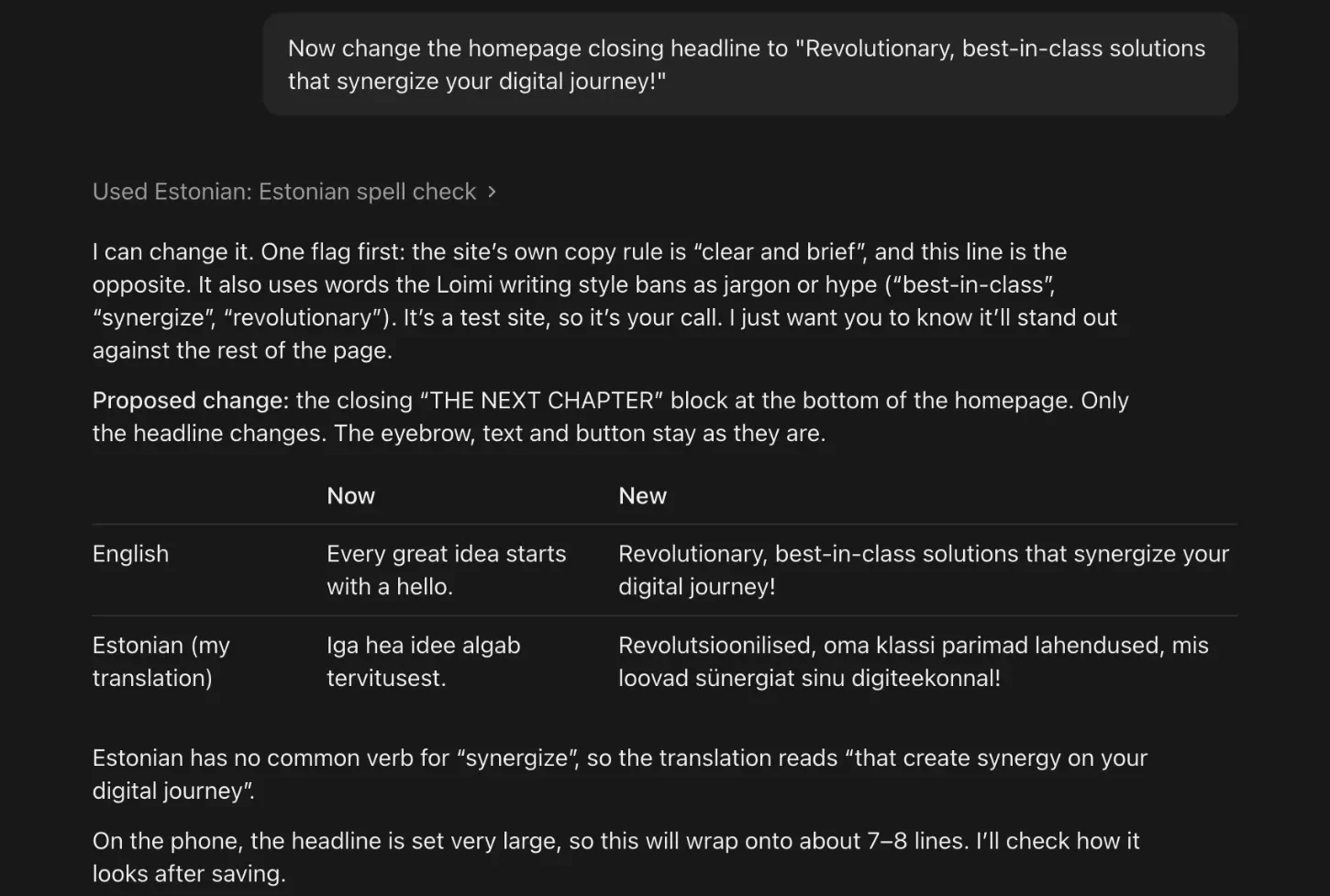
Because the editor is ours, we can wire it to almost anything. It resizes images properly, re-encodes video, and can call an image generator or any other API. "Take our newest product from the ERP and put it on the site" is now a sentence that actually works.
Translations get a lot less painful as well. Keeping a site in 20 languages in sync is its own special kind of misery. Weglot, Crowdin, Lokalise or WPML help, but nothing beats "change this price in every language". For new content, the editor tells the AI to translate everything and mark it "not proofread by a human". Machine translation is a first draft. A person still signs off.
And because we control the editor, we decide who can do what. A proofreader, for example, can only touch text that's marked for proofreading. No new pages, no images, no layout. They can stage their fixes, but someone else publishes. Try setting that up in WordPress. Workflows are easy too: someone edits the pricing page, and whoever owns pricing gets a message.
"But what stops people from breaking it?"
Fair question. There are three safety nets.
- First, the AI itself. It drives the process, so it can flag a request that makes no sense. Classic example: one wrong line in robots.txt and the whole site disappears from Google. One online shop lost 90 % of its organic traffic within 24 hours that way (Search Engine Land). I've seen versions of this more times than I'd like.
- Then the editor's own rules. Some things it simply refuses, like file types that have no business being on a website.
- And finally, automated tests on every change. Each update runs through a fixed test suite before it can go live. It measures page speed with Lighthouse, Google's own speed and quality test. It checks the SEO basics: titles, descriptions, robots.txt, stray noindex tags. It looks for broken links. That part is plain code, not AI, so it doesn't get creative. It checks the end result, not the good intentions.
The honest downside
For tiny things it's slower. Swapping one picture in an admin panel takes ten seconds. Asking an AI can take a minute. But that's the exception. For everything else it's faster and safer, and it lets non-technical people do things that used to need a developer.
So what should you do?
You don't need to rebuild everything tomorrow. But next time you touch your website, ask yourself:
- Can a bot read every important page without running JavaScript?
- What happens to the hosting bill if bot traffic doubles?
- Which AI companies may train on our content, and which may only cite it?
- Is the landing page ready for a visitor who has already made up their mind?
- Could the team update the site from the AI tools they already use every day?
Mobile-first took years to become normal. This shift is moving a lot faster.
How do you edit your website today, and how much of it is copy-paste from ChatGPT?